How AI Marking Keeps Teachers in Control of GCSE English Feedback
Worried AI marking will replace your professional judgement? Here's how Ariel keeps teachers in control — review, class analysis, whole-class feedback.
The worry teachers raise most often about AI marking isn't accuracy. It's this: will I stop knowing my class?
Will students feel their feedback came from a machine? Will I lose the feel for who's struggling, who's improving, who's capable of more than their last essay showed? Will I walk into a lesson not really knowing what I'm walking into?
These are the right questions. Here's exactly how Ariel answers them.
Every AI mark is reviewed by the teacher before students see it
When Ariel finishes marking a batch of GCSE English essays, nothing reaches students. Everything lands in a teacher review queue.
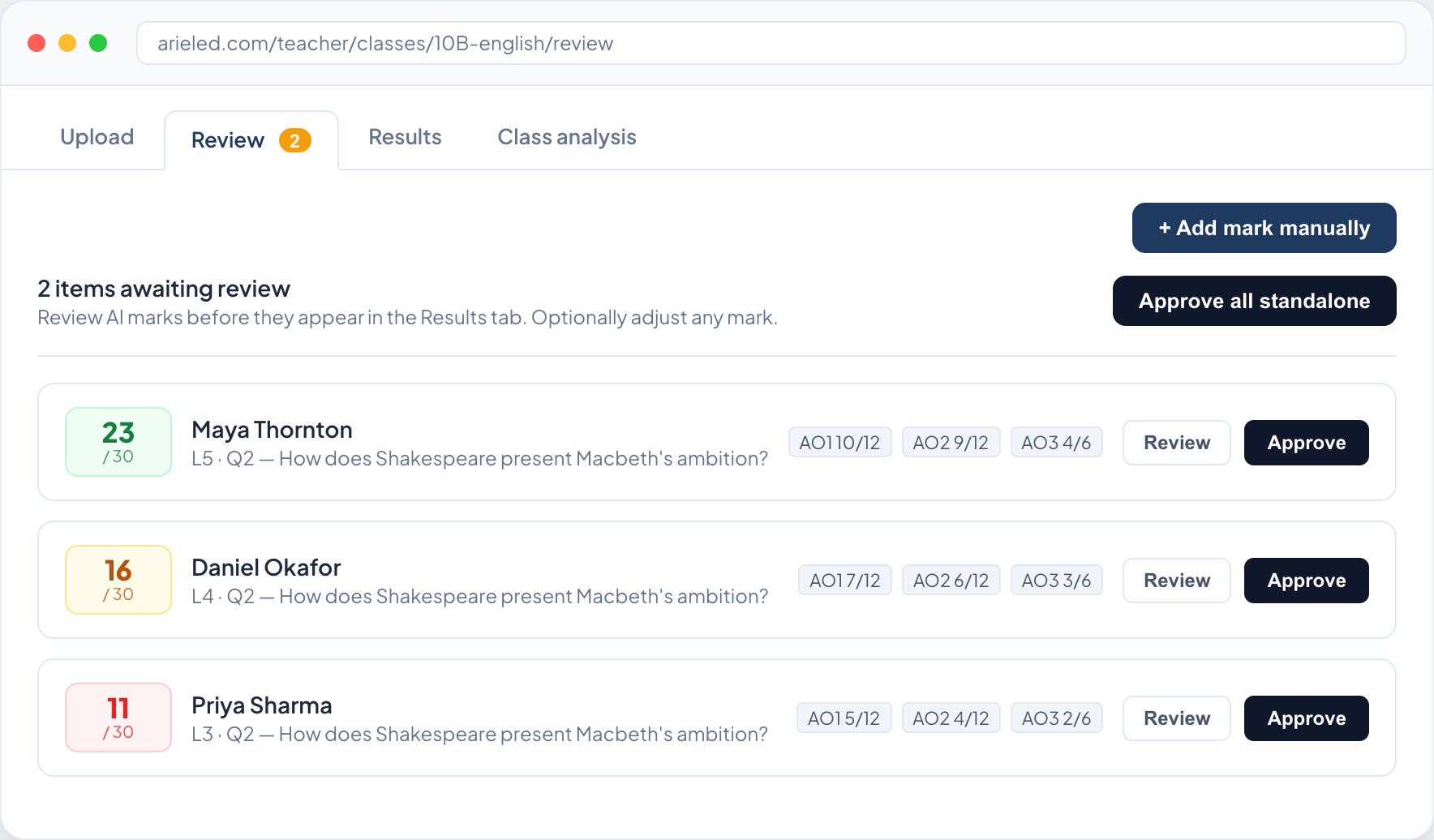
For each essay, you see the mark, the level, a breakdown by assessment objective, and the specific strengths and areas to develop — each one tied to a short quote pulled from the student's own writing. The full essay text is there too. You read it. You check whether Ariel's judgement matches yours.
If it does, you approve. If it doesn't, you override — enter your mark, note your reason, and approve. Both the AI's suggestion and your decision are saved. The mark that reaches the student is yours.
This isn't a checkbox. It's the point. The review stage is where your professional knowledge of a student — what they're capable of, what they were attempting, what a mark of 14 means for this student at this point in the year — shapes what the feedback actually says. Ariel gives you a draft. You make the call.
Class analysis: see patterns across your whole cohort
Once you've approved the batch, you can run Ariel's class analysis — a diagnostic that works across every essay you've just marked.
It shows AO averages across the class, the things your students do consistently well, the things they consistently don't, and two specific teaching priorities for the next lesson. It surfaces which students need support, which have improved, which are at risk of falling further behind.
Most of this you already knew. The analysis confirms it — and occasionally surfaces something you hadn't clocked: that 19 of your 30 students are using context decoratively rather than analytically, or that the students you thought were middling on AO2 are actually your strongest. That kind of pattern is hard to see when you're reading essays one at a time on a Sunday evening.
You can also ask the analysis direct questions in plain English — "which students improved most between the two mocks?", "what should I teach next week?" — and it answers from your class's real data, not a generic response.
Whole-class feedback PowerPoint built from your students' work
After the analysis, you can download a GCSE English feedback lesson PowerPoint — ready to open, ready to project.
It contains real quotes from your students' essays, named. It shows the class what strong work looks like at different levels, built from phrases and ideas that came from people sitting in the room. The model paragraphs are woven from your students' own writing — not generic examples, not AI-generated prose — with contributing students credited on the slide.
Students see their work taken seriously. They see what a Level 5 response looks like in the context of the question they actually answered, drawn from a classmate who got there. That's a different experience from a generic mark scheme extract — and a different experience from wondering whether a machine generated their feedback.
Every student also receives a printable feedback slip: their mark, their AO breakdown, their strengths, their two specific improvement tasks, and a ruled space for a teacher's note. Something physical, with their name on it and their words quoted back at them.
What AI marking for GCSE English actually changes
It doesn't change what you know about your students. It changes how long it takes to get marked work back to them, and how consistent the standard is across the batch.
The teacher who reviews Ariel's marking still reads every essay. Still approves every mark. Still runs the feedback lesson, still writes the teacher's note, still knows who needs the conversation after class. The difference is that the first pass — applying the mark scheme, identifying strengths and weaknesses, generating AO-referenced feedback — happens in minutes rather than hours.
That time goes somewhere. Usually it goes into the lesson the analysis says your class actually needs.
For detail on how accurate Ariel's marking is before it reaches your review queue, see How accurate is AI marking for GCSE English? Ariel's methodology explained.
Frequently asked questions about AI marking and teacher control
Does AI marking replace the teacher's professional judgement?
No. Every mark Ariel produces is a draft. Teachers review every essay, approve or override every mark, and nothing reaches students until the teacher has signed off. The AI applies the mark scheme consistently; the teacher makes the final call.
What does the teacher see when reviewing AI-marked GCSE essays?
The full essay text, the AI's mark and level, an AO breakdown, and specific strengths and areas to develop — each with a quote from the student's own writing. Teachers can approve as-is or override with their own mark and reason.
Can students tell their feedback came from AI?
Students receive feedback that quotes their own writing directly, names their specific strengths, and sets two personalised improvement tasks. At the review stage, teachers read and approve every piece of feedback — what reaches the student reflects a teacher who engaged with their work.
Does Ariel generate the feedback lesson PowerPoint automatically?
The PowerPoint is generated from your class's marked and approved essays. It contains real student quotes, model paragraphs woven from your students' own writing, and is built around the specific question they answered — not a generic template.
What is the class analysis in Ariel?
After a batch is marked and approved, teachers can run a class diagnostic that identifies AO averages, common strengths and weaknesses, intervention groups, and two specific teaching priorities. Teachers can also query the data directly in plain English.
Can teachers add their own notes to student feedback?
Yes. Every student's printed feedback slip includes a ruled "Teacher's note" section for personalised written comments.